CSS specificity

CSS Specificity is a weight that is applied to a CSS rule, determining which style should be applied when multiple styles are conflicting. In this blog post, we will explore what CSS specificity is, how it works, and how to use it to write maintainable and scalable CSS code.
What is CSS Specificity?
When multiple CSS styles are applied to the same element, the browser needs to determine which style to apply. This is where CSS specificity comes into play. Specificity is a way of determining which CSS rule should take precedence over the others. The more specific a CSS rule is, the higher its specificity and the more likely it is to be applied.
How does CSS Specificity work?
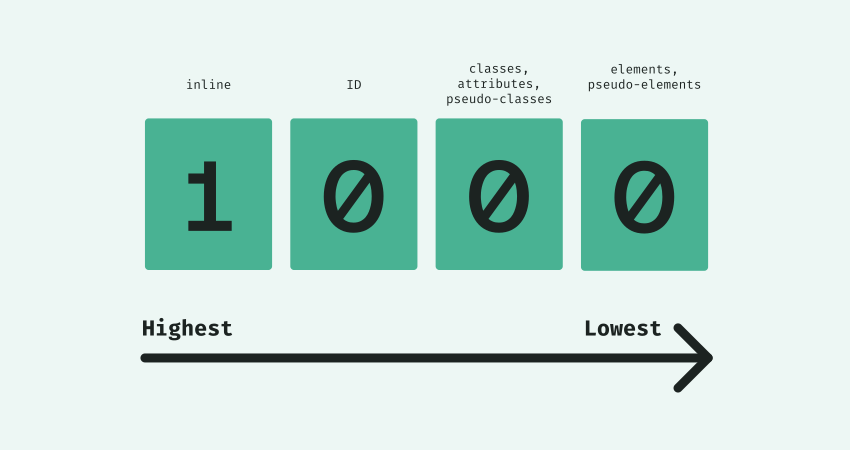
CSS specificity is determined by the number of each selector type in the CSS rule. A higher number of a selector type means a higher specificity. For example, an ID selector has a higher specificity than a class selector. The CSS specificity is calculated by counting the number of ID selectors, class selectors, and element selectors in a CSS rule. The more specific selector wins.
For example, consider the following CSS:
#header h1 {
    color: blue;
}

h1 {
    color: red;
}
In this case, the text inside the h1 element inside the header element will be blue, because the first rule has a higher specificity due to the ID selector #header.
CSS Specificity Hierarchy
When two selectors have the same specificity, the last rule defined wins. That's why it's important to order your CSS rules correctly.
The CSS specificity hierarchy is:
Inline styles (inline styles applied directly to an HTML element)
ID selectors (#id)
Class selectors (.class), attribute selectors ([attribute]), and pseudo-class selectors (:hover, :active, etc.)
Element selectors (h1, div, etc.)
Universal selectors (*)
How to use CSS Specificity?
To avoid specificity conflicts, you can use CSS preprocessors such as SASS or LESS, which allow you to use nesting and variables to keep your CSS organized and easy to read.
It's also a good practice to use a consistent naming convention for your selectors, such as BEM, to make it easier to understand the specificity of your CSS.
Another way to avoid specificity conflicts is to use the !important rule, but it should be used with caution, since it can quickly make your CSS difficult to maintain.
Summary
In summary, CSS Specificity is a fundamental concept to understand when working with CSS. It helps you to write maintainable and scalable CSS code. By understanding how specificity works, you can avoid conflicts and create a more organized and readable codebase.